Time Log Teams – time spent on other Teams’ sites (must have 3 entries or more):
Date: Feb. 22, 2026 From: 05:18pm To: 05:30pm
Date: Feb. 23, 2026 From: 08:07pm To: 08:21pm
Date: Feb. 24, 2026 From: 06:42pm To: 06:54pm
Date: Feb. 26, 2026 From: 09:11pm To: 09:25pm
Date: Feb. 27, 2026 From: 07:36pm To: 07:49pm

Time Log Students – time spent on other students’ sites (must have 3 entries or more):

Date: Feb. 22, 2026 From: 06:03pm To: 06:15pm
Date: Feb. 23, 2026 From: 09:28pm To: 09:41pm
Date: Feb. 25, 2026 From: 07:14pm To: 07:25pm
Date: Feb. 26, 2026 From: 10:02pm To: 10:17pm
Date: Feb. 27, 2026 From: 08:48pm To: 09:00pm


Essay I. Summary of your activities in your contents including new contents created (one paragraph). Provide all the hyperlinks (clickable) of new contents you have created this week.
This week, I focused on creating two personal, story-driven WordPress content drafts that reflect meaningful chapters of my life rather than resume-style summaries. I wrote one post about my service in the Republic of Korea Army, highlighting how that period shaped my discipline, problem-solving mindset, and communication skills, and another post about my 17-year piano journey, including how classical and jazz music influenced my musicality and why I ultimately chose a different path for college while still carrying music with me as part of my identity. I also organized supporting references for each post, including a news article related to the K-Startup competition and the original piano performance version for comparison/context.

- 17 Years of Piano: http://13.52.17.154/2026/02/26/17-years-of-piano/
- ROKA Service: http://13.52.17.154/2026/02/26/my-service-in-rok-army/

Essay II. Summary of your "Thank you" event conversion (add screenshots) (one paragraph)
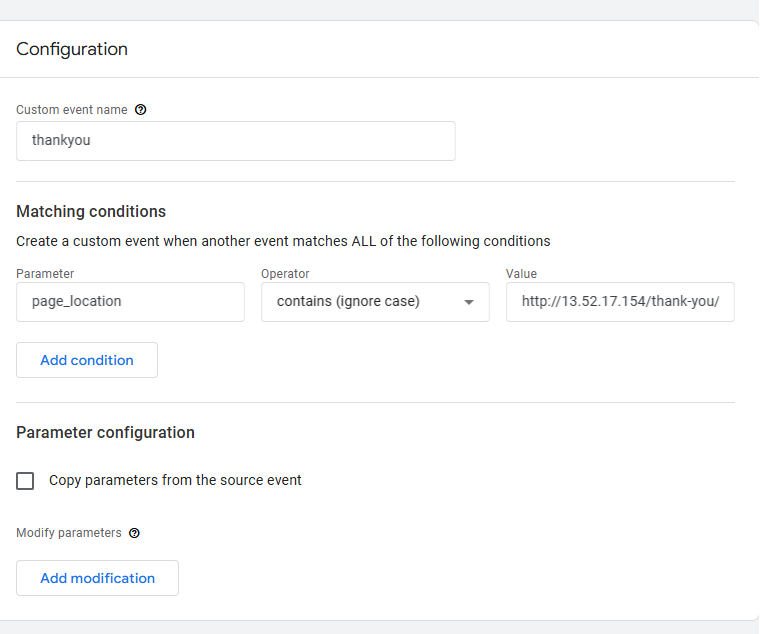
For my “Thank you” event conversion, I configured a GA4 event trigger using a page_location parameter condition so that the event fires only when the URL contains the specific Thank You page path. This setup helps ensure that the conversion is tracked only after a user reaches the final confirmation page (such as after submitting a form), which makes the measurement more accurate than tracking a button click alone. After creating the trigger and testing it, I verified that the event fired correctly when the Thank You page loaded, and then I marked it as a conversion in GA4 so it can be included in conversion reporting. The screenshots should show (1) the trigger condition using page_location contains [thank-you URL], (2) successful event firing in preview/debug mode, and (3) the event listed in GA4 conversions.
Essay III. Summary of your “menu click” event conversion (add screenshots) (one paragraph)
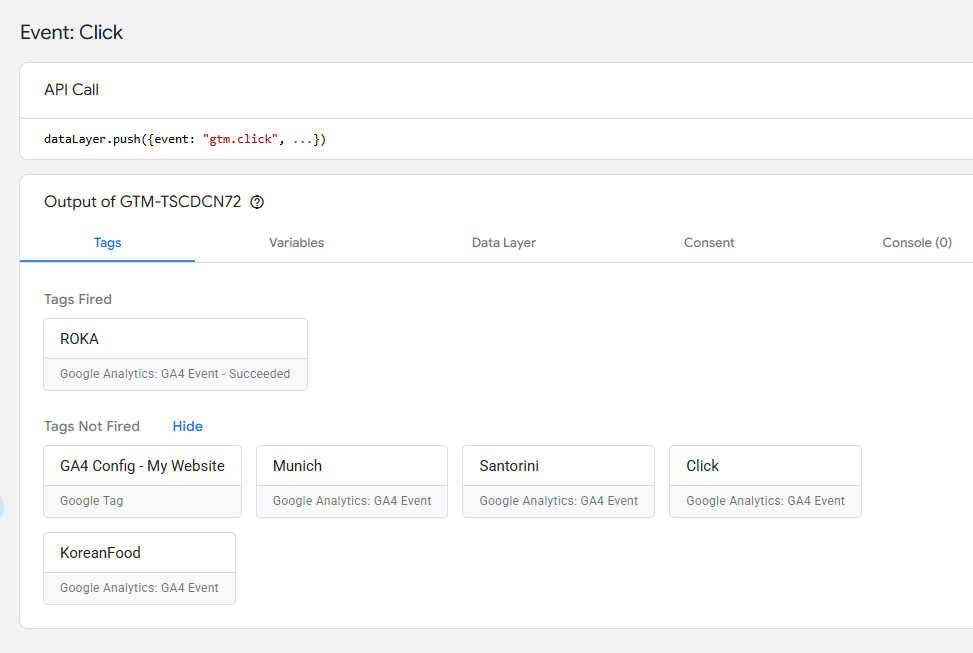
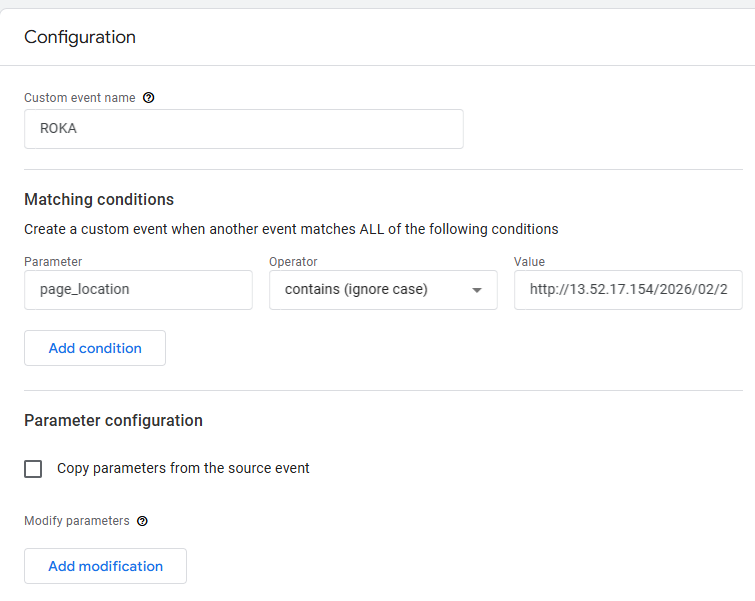
For my “menu click” event conversion on the ROKA page, I set up the event using a page_location-based condition so it only tracks activity when users are on the ROKA page (instead of across the whole site). Specifically, I configured the trigger so that the event fires when the page_location contains the ROKA page URL, which helps isolate menu interactions related to that content and keeps the conversion data more relevant. After setting the condition, I tested the setup in preview/debug mode to confirm the event triggered correctly while navigating the menu on the ROKA page, and then I verified it appeared in GA4 for reporting. The screenshots should show (1) the trigger condition with page_location contains [ROKA page URL], (2) the event firing in debug/preview mode during a menu click on the ROKA page, and (3) the event visible in GA4 event/conversion reports.