Time Log:
1. Date: Feb. 01, 2026 From: 11:31pm To: 11:47pm
2. Date: Feb. 02, 2026 From: 5:05pm To: 5:25pm
3. Date: Feb. 04, 2026 From: 11:14pm To: 11:32pm
4. Date: Feb. 07, 2026 From: 9:08pm To: 9:30pm
5. Date: Feb. 08, 2026 From: 6:01pm To: 6:22pm

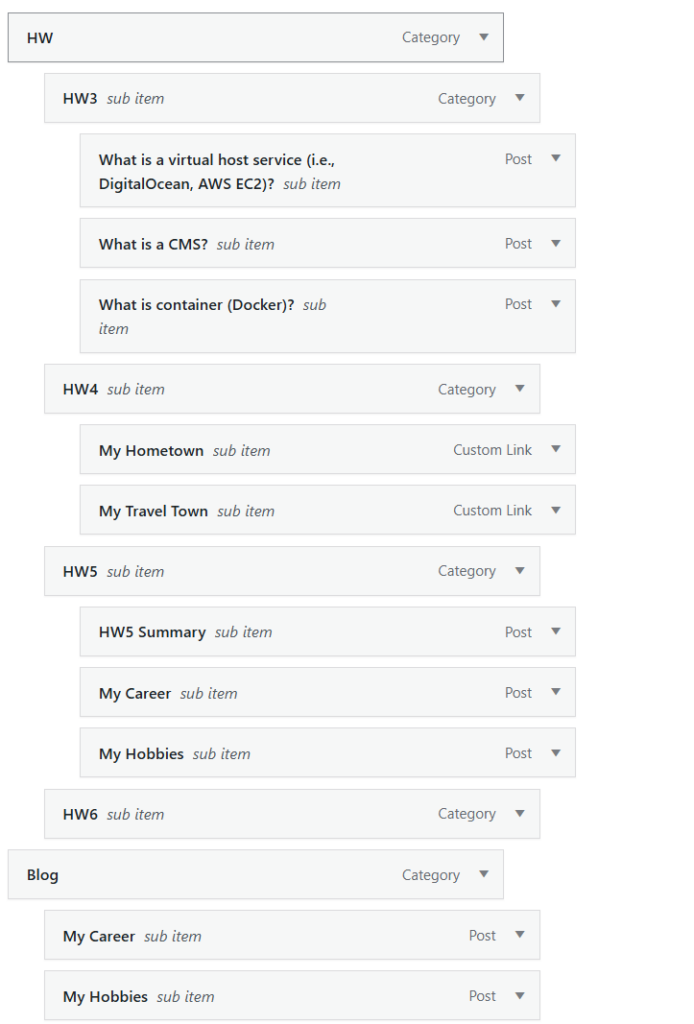
Part I. Describe your menu structure and what you have implemented in your CMS
My menu structure currently has two main tabs. One for the homework and one for my blog posts (which contain posts like My hobbies and My career).
Part II. Discuss what new contents you have added. Provide all the links of new contents.
In terms of the contents that I have added, I have added a menu link for both my hometown and travel town post. You can see them in the below links
1. Travel Town : http://13.52.17.154//class/traveltown.html
2. Hometown : http://13.52.17.154//class/hometown.html
Part III. Discuss what you have developed/achieved in managing categories/tags
When organizing categories and tags, I created a clear structure by assigning a primary category such as “HW” or “Blog,” along with individual tags for each specific homework assignment. This allows the posts to be grouped broadly while still remaining easy to filter by assignment.
I’ve considered whether to introduce more granular tags (for example, adding a specific “CMS” tag for HW3 posts) but for now, I believe the combination of major categories and assignment-level tags provides sufficient organization for this stage of the project. As the content grows, I can always refine the structure and introduce more detailed tags if needed.
Part IV. Describe how you use category search for visitors (i.e., side search bar) and tag cloud plugin
To improve navigation and user experience, I use a category search feature in the side search bar to help visitors quickly filter content based on major topic groupings. This allows users to browse posts by structured categories such as “HW” or “Blog,” making it easier to locate assignments or thematic content without scrolling through the entire site. The side search bar provides a clean and intuitive way for visitors to access relevant posts based on their interests.
In addition, I implemented a tag cloud plugin to enhance content discoverability. The tag cloud visually displays frequently used tags, with larger text representing more commonly used topics. This gives visitors an immediate overview of key themes across the site and encourages exploration beyond chronological browsing. By combining structured category navigation with flexible tag-based discovery, the site balances organization with accessibility, allowing users to engage with content in multiple ways.
I like how clearly you break your HW5 work into structure, content, and navigation, so it’s easy to see your progress at a glance. Your menu design with separate HW and Blog tabs feels clean and matches how visitors will likely think about your site. The way you’re using categories for HW vs. Blog and tags for individual assignments is smart for this stage, and I like that you’re already thinking about when you might add more granular tags later. Your explanation of the side category search and tag cloud is also strong because you connect each feature to user benefits like easier filtering and discovery, not just I turned this on, which shows good UX awareness.